Прошивка LG L80 Dual: официальная прошивка через KDZ
Смартфон LG L80 от южнокорейского бренда работает под Android 4.4. Здесь можно получить рут права, скачать официальные прошивки и кастомы, а также инструкции. Кроме того, есть инфа, как сбросить настройки (hard reset) или графический ключ. Этот смартфон - нуждается в дополнительной оценке.
Прошивки для LG L80
Официальная прошивка - (перепрошивать утилитой )
Оф. прошивка V10c-CIS-XX - (прошивать через CWM)
1.Скачанную прошивку скопировать на внешнюю SD карту.
2. Зайти в режим recovery.
3. В CWM делаем wipe data/factory reset, wipe cache partition,
заходим в пункт advanced, делаем wipe dalvik cache, возвращаемся на главную страницу CWM
4. Заходим в пункт mounts and storage, делаем format /system, format /cache, format /data возвращаемся на главную страницу CWM.
5. Выбираем пункт install zip, далее choose zip from /external_sd и выбираем файл прошивки.
6. Ждем пока прошивка установится.
7. Возвращаемся на главную страницу CWM и перезагружаемся, выбрав пункт reboot system now
(если возникает предложение: - Yes - Fix root (/system/xbin/su) выбираем его)
Какие есть кастомные прошивки (firmware)?
- CM - CyanogenMod
- LineageOS
- Paranoid Android
- OmniROM
- Temasek's
- AICP (Android Ice Cold Project)
- RR (Resurrection Remix)
- MK(MoKee)
- FlymeOS
- Bliss
- crDroid
- Illusion ROMS
- Pacman ROM
Проблемы и недостатки смартфона от LG и, как их исправить?
- Если L80 не включается, например, видите белый экран, висит на заставке или вовсе только мигает индикатор оповещений (возможно, после зарядки).
- Не заряжается (обычно, проблемы с железом)
- Не видит сим-карту (симку)
- Не работает сенсор (зависит от ситуации)
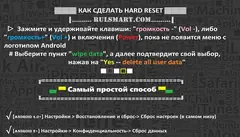
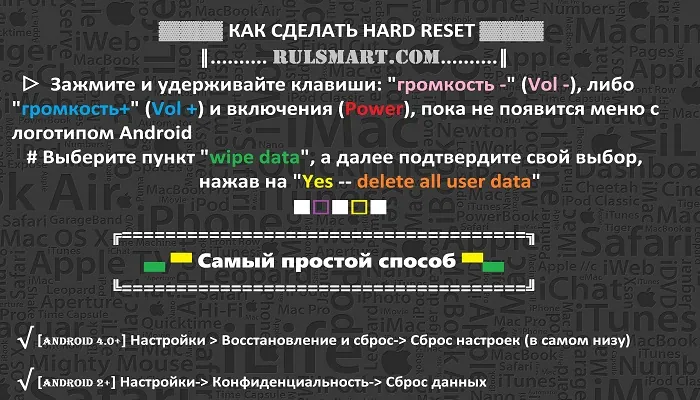
Hard Reset для LG L80
Инструкция, как сделать Hard Reset на LG L80 (сброс настроек). Рекомендуем ознакомиться с наглядным руководством, которое называется на Android. .
- *2767*3855#
- *#*#7780#*#*
- *#*#7378423#*#*
Hard Reset через Recovery
- Выключите устройство-> зайдите в Recovery
- "wipe data/factory reset"
- "yes - delete all user data"-> "Reboot System"
Как сбросить графический ключ
- Сброс граф. блокировки -
- Сброс пароля -
Предупреждение
Подготовка
Саму официальную прошивку в формате.KDZ
Прошивка
Обновление официального ПО и восстановление "кирпича"
Чем и зачем прошивать Android LG?
Необходимые компоненты и инструменты
1. Компьютер или желательно ноутбук
6. Micro-USB кабель
5. Открыть Диспетчер устройств на ПК
9. Выбрать прошивку KDZ
Удачных Прошивок!
Остались вопросы?
This time I want to talk about LG L30 smartphone, its features and firmware. I have to admit that I have special feelings with this phone, because I used it for about two years. I have my oww opinion about it, and I am ready to share it with you.
LG L30 was released in 2014, and I immediately bought it. Of course, it was not a flagship smartphone, but it offered quite interesting features. Now 3.2-inch display looks very small, but at that time I was very pleased with its using. It is a compact phone that fits comfortably in any hand and in any pocket.
As for performance, it is also good. 512 MB of RAM and 4 GB of internal memory - this may seem strange, but few years ago it was good hardware. The phone ran any games and applications without any problems. Now when no one is surprised by 8 GB of RAM and 128 GB of internal memory, LG L30 looks very old, but I must say that some of my friends still use it as their primary device.
Of course, I have good memories of this device, and if you are the same lucky owner, then you may need LG L30 firmware. Below I have a complete list of available firmware, as well as instructions on how to install it.
LG L30 was sold all over the world, so the smartphone is available in different models. They are practically the same, and differs with only model number, but you still need to install the firmware for your model. If you install the firmware for another phone model, you may have problems. Be careful!
LG L30 firmware
If you install LG L30 firmware for the first time, then you need to read tutorial. I prepared a step-by-step guide on how to install KDZ firmware.
Are you ready? Then use the link below to download all available LG L30 firmware.